Domains in Properties & Specifications
Assigning domains (DE: Disziplinen) to properties help you to clarify who is responsible for the property - for managing on the platform and delivering in the model. Learn everything about how to use the domains in properties and specifications
Written By Stefan Hellweg
Last updated 9 months ago
How to use domains in properties & specifications
To use domains in properties & specifications you have to create them in the project access management area first.
Learn more about creating domains here: Access Management
To be able to assign domains you need to have access to the respective domain. So if all domains are disabled in the dropdown then you should visit the access management and assign the domains that you are responsible for to yourself, or if you do not have the rights for the access management ask someone who can do it for you.
You can assign domains to properties and specifications when you create or update them.
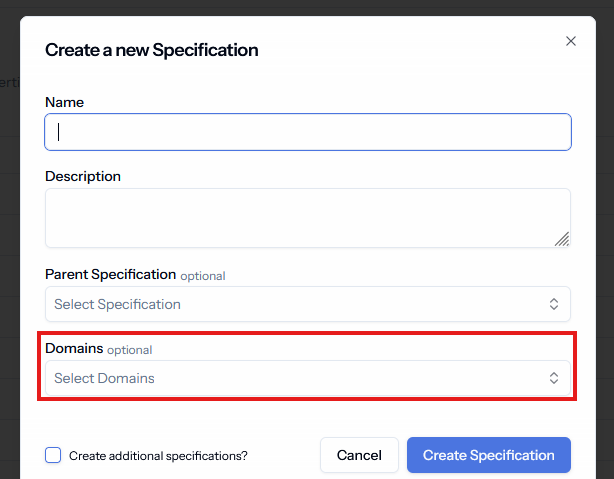
Assigning domains is always an optional step.
Inherit domains in properties & specifications
Domains can be inherited for a more efficient management of the various domains in your catalog.
In Properties:
Properties inherit the domain of the property group that they belong to. So if you have a property group only with properties for a specific domain you can assign the domain on the property set instead of assigning it to every property separately.In Specifications:
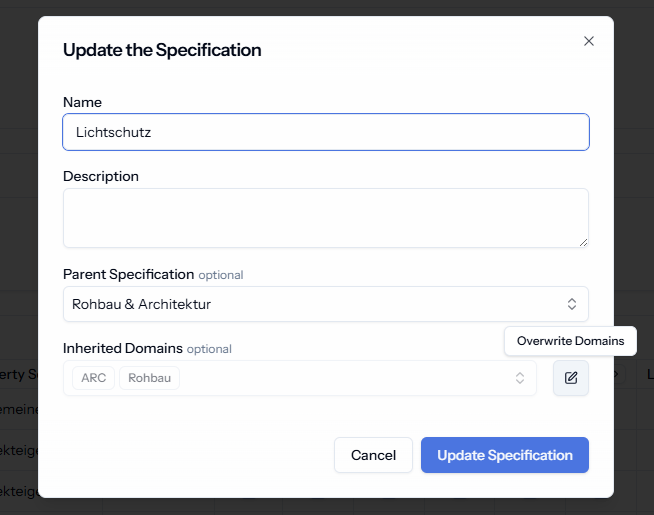
Specifications inherit the domain from their parent specifications.
You can always overwrite the inherited domains, if you want to restrict it further:
When and why should I use domains?
We recommend to use domains when working on a project where many people with clearly defined roles are involved. Assigning domains to specifications and properties not only makes it clear who is responsible for delivering the required information, but it also prohibits users from making changes in the requirements where they are not supposed to.
If you do not select a domain for a given specification or property, every team member with editing rights can change them by default.
💡Assign a domain and a role to every team member to manage access most effectively. Find out more about roles here: Access Management
Was this helpful?
Still need help? Share an idea