Overview
Get an overview of the usage of projects and standards.
Written By Antonia Langner
Last updated About 1 year ago
Projects vs. Standards
If you create a project and a standard, you will see that they look the same. We differentiated these two concepts for two reasons:
By differentiating a standard from a project, the standard gets a different meaning.
The standard is supposed to be superordinate and more general than the projects. An organization can manage their standard separately from the projects and the local separation from the projects on the Home view makes the recognition as this more easier.We already have some new features in mind that will work for specific projects but not for general standards. These are features that include delivery dates and other information that are project specific and do not exist in a general standard.
How to use Projects and Standards
Standard:
Create a standard when you want to build a template with your default requirements that you want to use as basis for your projects.
Everything you do here should not be project specific.Invite everyone from your organization who should have access to this standard to use it as template for their projects.
Everyone with access to the standard will be able to create new projects from the standard.
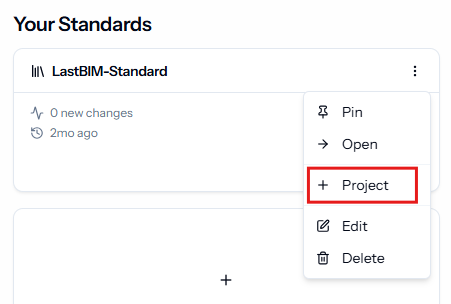
This will copy everything from the standard to a new project except for the members and the change history.
Project:
Use a project to manage project specific requirements.
Invite all project members.
You can use a standard or another existing project as a template when creating a new project so you do not have to start from zero with every new project.
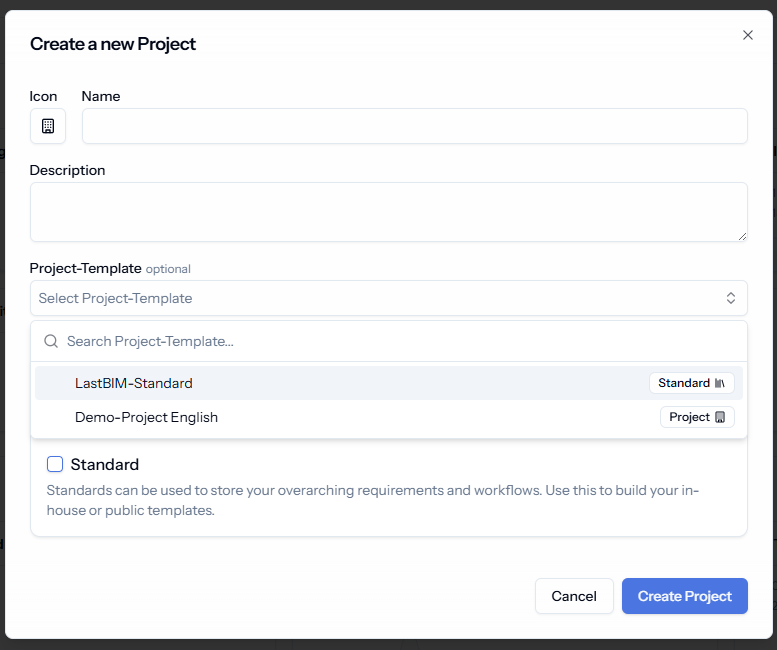
💡 Still not sure, what to use?
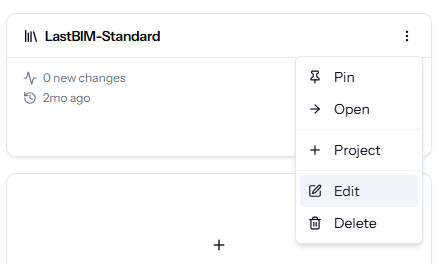
No worries! After the creation you can still switch if it should be a project or standard by going to the project or standard settings and changing the type.
Was this helpful?
Still need help? Share an idea