Synchronize Parameters in Revit
Parameters in Revit need to be synchronized with the property definitions on the platform. Learn how it works and what to do when you experience synchronization issues in this article.
Written By Antonia Langner
Last updated 18 days ago
Check the following article on how to configure the plugin before synchronizing: Configure your Plugin
How the Synchronization Works
When starting the plugin for the first time or when the requirements change, you will be prompted to synchronize the parameters in Revit.
Based on the parameter GUIDs, the plugin checks whether the required parameters do already exist. Missing parameters will be automatically created by the plugin as shared parameters within your project. Existing parameters will be updated.
The following information will be automatically updated:
Parameter name
Parameter data type
Parameter binding (type vs. instance)
You will get an overview of how the synchronization will effect the parameters in your project:
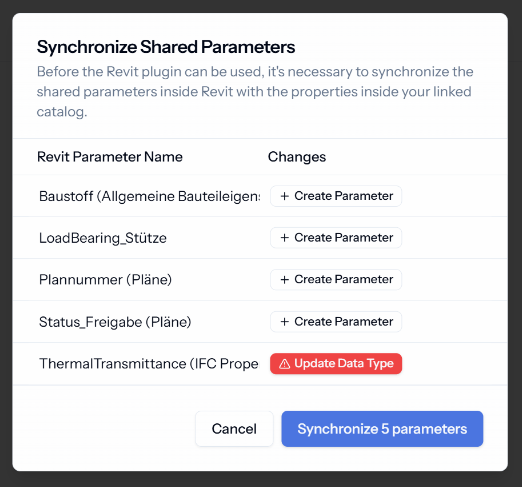
To use the LastBIM plugin in Revit, you cannot skip the synchronization step, as this ensures that everyone is working with the latest information.
If the changes listed in the synchronization table do not correspond to what you expected, please check the settings on the platform.
Issues with Synchronization
Pinned Properties
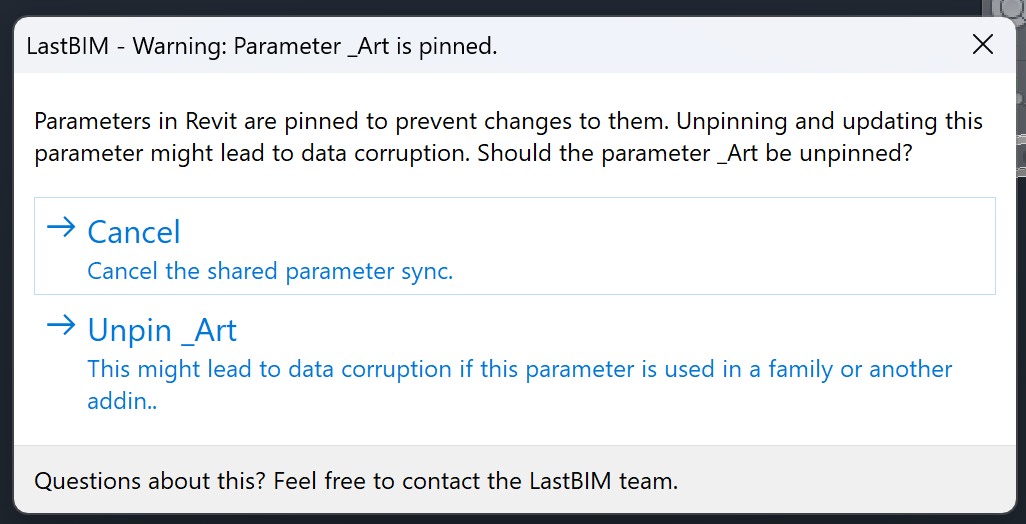
Parameters in Revit can be pinned. Pinned parameters can not be changed or deleted. This can happen e.g. through other plugins.
To synchronize them anyway, you will get prompted to unpin those parameters. Before doing this step, please check, if the pinning of the parameter had a purpose or not.
Other Issues
The synchronization might fail if at least one parameter that needs to be synchronized is used somewhere where the plugin cannot restore the data or where deleting the parameter is not possible.
In this case, please check if the parameter is used in families of the project, in formulas, or similar.
Also when experiencing issues with the synchronization, make sure that you use the latest plugin version. Some synchronization issues where already fixed in later plugin versions.
Was this helpful?
Still need help? Share an idea